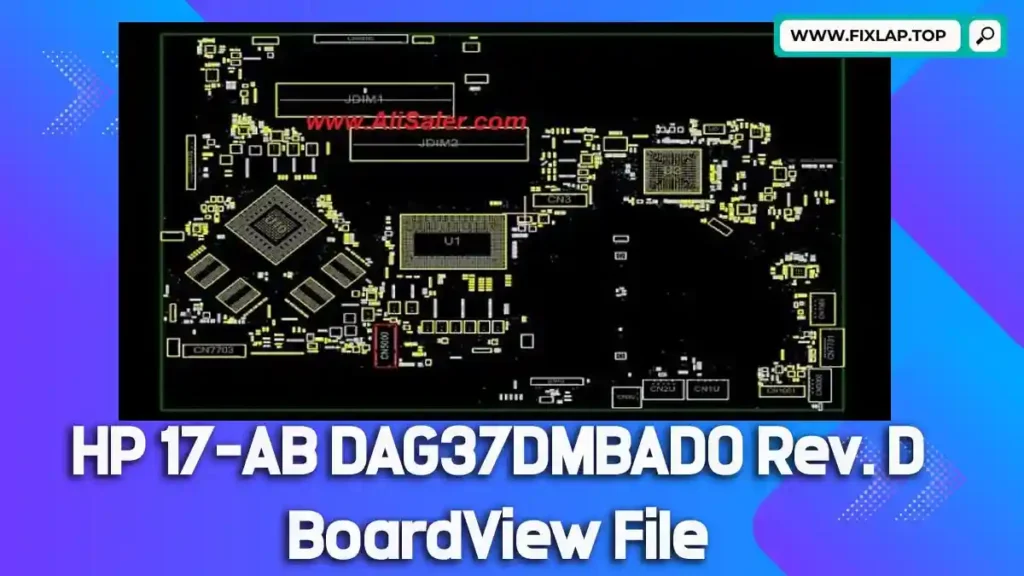
Download HP 17-AB DAG37DMBAD0 Rev. D BoardView File Free
Got a non-booting or dead HP 17-AB laptop? Don’t rush to replace the motherboard—there might be a cost-effective way to fix it yourself. With the HP 17-AB DAG37DMBAD0 Rev. D boardview file, you gain a visual roadmap of your board’s layout, helping you locate faulty components and troubleshoot issues accurately.
At FixLap, we aim to reduce e-waste and support a thriving repair community by offering free boardview files, schematics, and BIOS resources. No account required.
What Is a Boardview File?
A boardview file is a schematic-style map of a motherboard, showing every component’s position, electrical traces, and test points. It is especially useful for board-level repairs, helping you trace power, find ICs, and pinpoint problems.
🔍 Common Boardview File Extensions:
.brd,.bdv,.bv,.fz,.asc,.cad,.gr,.cst,.f2b
To open these files, you’ll need compatible BoardViewer software. We recommend:
Why Use Boardview and Schematics for Laptop Repairs?
If you’re working without schematics or boardview files, you’re flying blind. These tools are essential for effective, efficient motherboard repairs.
🔧 Benefits of Boardview Files:
- Identify faulty MOSFETs, capacitors, or ICs
- Follow power rails and signal paths
- Detect short circuits and open lines
- Save hours of trial-and-error troubleshooting
Whether you’re repairing a water-damaged motherboard or diagnosing no-power issues, a boardview file is a must-have tool in your kit.
📎 Download HP 17-AB DAG37DMBAD0 Rev. D BoardView File
Ready to repair? Get the verified, safe-to-use boardview file below:
📁 Model: HP 17-AB
🖥 Motherboard: DAG37DMBAD0 Rev. D
🔗 Direct Download:
👉 Click to Download Now
How to Open and Use Boardview Files
Follow these steps to use the boardview file effectively:
Step-by-Step:
- Download the file from the above link.
- Install BoardViewer software from our recommended tools.
- Open the file in the software.
- Use search tools to find specific components (like PQ101, PU301, etc.).
- Cross-reference components with schematics for diagnosis and testing.
Our Mission: Promote Repairs & Reduce E-Waste
We’re passionate about extending the life of electronics. With every boardview and schematic we provide, we’re enabling:
- Students and learners to gain real-world repair skills
- Technicians to reduce turnaround time and guesswork
- Laptop users to fix devices instead of dumping them
Let’s fix more and waste less.
Related Downloads You Might Find Useful
- 📘 Download Toshiba PT10S UMA MB REV:2.1 Boardview
- 💻 Dell Latitude E6540 LA-9411P Boardview File
- 🖥️ Dell Latitude E5450 ZAM70 LA-A901P Boardview File
Conclusion
Don’t throw away your HP 17-AB when you can bring it back to life. With this free DAG37DMBAD0 Rev. D boardview file, you have the map you need to diagnose and fix your motherboard quickly and confidently.