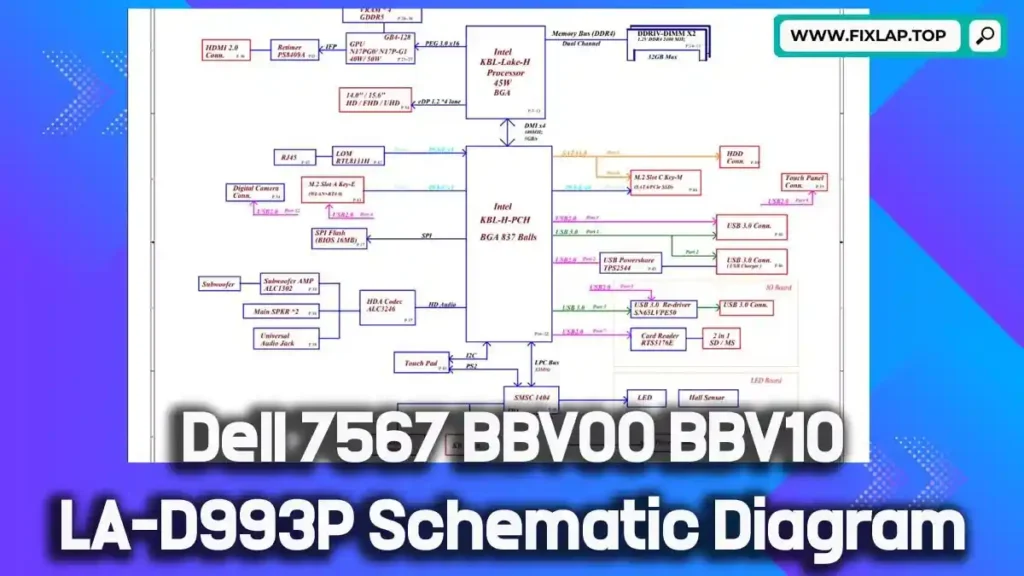
Download Dell 7567 BBV00 BBV10 LA-D993P Schematic Diagram PDF Free
If you’re troubleshooting a Dell Inspiron 15 Gaming 7567 laptop, having access to the LA-D993P BBV00 BBV10 schematic diagram can be a game-changer. Whether you’re a technician or a DIY repair enthusiast, understanding your motherboard’s inner workings is critical to making fast, accurate repairs.
We provide this schematic diagram for free, with no registration or paywalls—part of our mission to reduce electronic waste and promote sustainable repair practices.
What Is a Schematic Diagram and Why Do You Need It?
Understanding Schematics
A schematic diagram is a technical drawing that shows how all components in an electrical circuit are connected. Unlike physical layouts, schematic diagrams use standardized symbols to represent resistors, capacitors, ICs, and more. These diagrams help you trace connections, voltages, and signal flows throughout the motherboard.
Benefits of Using Schematics in Laptop Repair
- 🔧 Quickly locate faulty components
- 🔍 Trace signal or power failures across layers
- 🧰 Diagnose accurately without trial and error
- ⏱️ Reduce repair time dramatically
- 💰 Save money by repairing, not replacing
Dell Inspiron 15 Gaming 7567 BBV00 BBV10 Motherboard Overview
The Dell Inspiron 15 7567 is a performance-oriented gaming laptop, known for its solid thermals and reliability. The BBV00 and BBV10 variants, built on the LA-D993P Rev 1.0 motherboard, include high-end GPU integration, thermal control logic, and power delivery systems.
Key Specs of the Motherboard:
- Intel Core i7 / i5 7th Gen CPUs supported
- NVIDIA GTX 1050/1050Ti/1060 GPU options
- DDR4 memory support
- High-performance power regulation and charging ICs
- Multiple I/O interfaces: USB 3.0, HDMI, SATA, etc.
- Discrete and integrated graphics switching (MUX/DEMUX)
A schematic of this complexity is critical to identifying issues with GPU, RAM, charging circuits, and system power.
Download Dell 7567 LA-D993P Schematic Diagram PDF Free
We’re committed to helping repair communities and reducing e-waste by offering this schematic for free.
- File Format: PDF
- Included Models: BBV00, BBV10
- Board Number: LA-D993P Rev:1.0
- Cost: 100% Free
- Access: No registration required
✅ Click the link below to download now:
👉 Download Dell Inspiron 7567 BBV00 BBV10 LA-D993P Schematic PDF
How to Use the LA-D993P Schematic Effectively
Step-by-Step Troubleshooting with a Schematic
- Open the PDF in a reader that supports search.
- Search for component IDs like PU901, Q702, R530.
- Check voltage rails, signal paths, and ground lines.
- Use a multimeter or oscilloscope to compare theory vs. actual values.
- Repair or replace faulty components based on data.
Common Repairs on the Dell 7567 Motherboard:
- No power or charging issues
- Dead GPU or thermal sensor faults
- Broken USB or display ports
- Short circuits or voltage dropouts
- BIOS-related boot problems
Conclusion
The Dell 7567 BBV00 BBV10 LA-D993P schematic PDF is an invaluable resource for technicians, engineers, and tech-savvy users. Whether you’re solving charging issues, GPU problems, or mainboard shorts, this schematic will help you do it faster and smarter.
📥 Download Now and join the growing community of repair enthusiasts who are keeping devices alive—and landfills empty.
💬 Got questions or need help? Reach out via our contact page.